AI-Powered Interior Design: From LiDAR Room Scans to 3D Furniture Layouts
AI-Powered Interior Design: Discover how AI-powered interior design tools transform LiDAR room scans into 3D furniture layouts. Learn about real-time redesign, style transfer, and the best apps for professionals and homeowners.
The Tape Measure Is Dead
You walk into an empty room. Sunlight streams through the windows. You can see the potential—a reading nook here, a dining table there, a statement piece against that wall. But translating that vision into reality has always required the same tedious ritual: measuring every wall, noting every window, sketching on graph paper, and hoping your furniture fits when it arrives.
That ritual is ending.
LiDAR—the laser-based depth sensor embedded in iPhones and iPads since the 12 Pro—has turned room scanning from a chore into a 10-second sweep. And when you combine LiDAR with generative AI, the result is nothing short of magical: walk through a space, and minutes later, you are exploring photorealistic 3D layouts in a dozen different design styles.
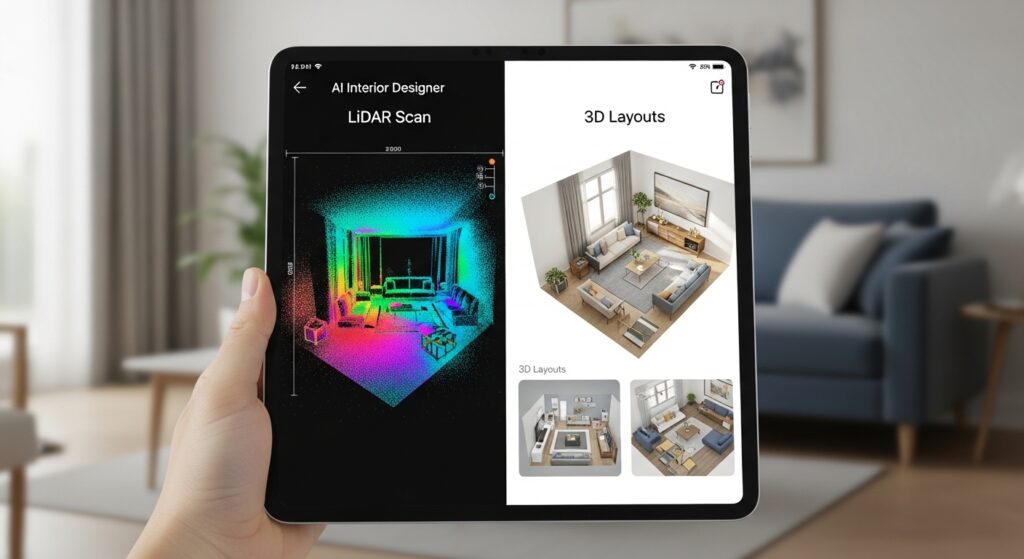
This is not science fiction. This is the reality of AI-powered interior design in 2026.
How It Works: The Three-Step Workflow
The technology stack behind AI interior design is simpler than you might think. Three core technologies work together:
| Layer | Technology | What It Does |
|---|---|---|
| Capture | LiDAR + ARKit | Measures room geometry, wall positions, and dimensions in real time |
| Processing | Computer Vision | Converts raw point clouds into structured floor plans and 3D models |
| Generation | Generative AI | Creates furniture layouts, material suggestions, and style variations |
Step 1: Capture with LiDAR
LiDAR (Light Detection and Ranging) works by firing thousands of invisible laser pulses per second and measuring how long each takes to bounce back. The result is a precise 3D point cloud of your space—accurate to within centimeters.
Modern apps have made the capture process astonishingly simple:
- Open the app and point your device at a corner of the room
- Slowly pan across all walls, doors, and windows
- The app detects geometry in real time, often with on-screen guides
- In 30-60 seconds per room, the scan is complete
What you need: Any iPhone or iPad with a LiDAR sensor (iPhone 12 Pro and later, iPad Pro 2020 and later).
Step 2: Generate Floor Plans Automatically
Once the scan is complete, AI-powered apps like Roomify, CamPlan, and RoomScan Pro process the data automatically. Within seconds, you receive:
- A 2D floor plan with accurate wall lengths, door positions, and window placements
- A 3D mesh model of the space
- Exportable files in standard formats (PDF, DXF, CAD, OBJ, USDZ)
The days of manual measuring and graph paper are over. A room that once took 30 minutes to measure and sketch now takes 60 seconds to scan and process.
Step 3: AI-Powered Design Generation
This is where the magic happens. With an accurate 3D model of your space, generative AI can now populate it with virtual furniture, finishes, and decor.
Apps like CamPlan and Roomify let you:
- Snap a photo of an existing room and describe changes in plain English: “Paint the walls sage green, add a mid-century modern sofa, and install floating shelves”
- Generate multiple style variations simultaneously—compare Scandinavian, Industrial, Coastal, or Art Deco side by side
- See real-time updates as you adjust colors, materials, or furniture placement
The AI understands your room’s actual dimensions, so every virtual piece of furniture is correctly scaled. No more falling in love with a sectional that is six inches too wide for your space.

The 2026 App Landscape: Tools for Every Need
The market has matured significantly. Here are the leading tools for AI-powered interior design this spring.
For Professional Designers: Scanbrix
Scanbrix has emerged as the professional’s choice for bridging site visits to design software. The platform’s key innovation is its Image to 3D feature: photograph any piece of furniture—a vintage chair, a bespoke table, a unique lighting fixture—and Scanbrix generates a clean, scaled 3D model ready to drop into SketchUp or Revit.
The professional workflow:
- An assistant scans an entire home in 15 minutes using the app
- The raw scan is processed and converted to a professional SketchUp file within one day
- Files arrive fully tagged and organized—no cleanup required
- The lead designer jumps straight into creative work, not data entry
For designers, this transforms the economics of a project. Time spent measuring is time not spent with clients understanding their vision. Scanbrix eliminates the former entirely.
For Homeowners and DIY: Roomify
Roomify (also listed as “Room Planner: 3D AI Design” on the App Store) is designed for simplicity. The app offers:
- 40+ design styles from Modern to Coastal to Art Deco
- One-tap style transformation—scan a room, pick a style, see a complete redesign
- Room library to store and revisit all your projects
- Export options for sharing plans with contractors or shopping lists
Pricing ranges from $6.99 monthly to $69.99 for lifetime unlimited access. For a homeowner planning a single renovation, the monthly option is perfect. For serial renovators, the lifetime purchase pays for itself quickly.
For Photo-Driven Redesign: CamPlan
CamPlan takes a different approach. While it supports LiDAR scanning, its standout feature is photo-driven AI redesign:
Snap a picture of any room and describe changes: “paint walls blue,” “add a reading nook,” “switch to Scandinavian style.”
The AI generates style guidance for colors, furniture, lighting, and materials that suit your specific space. All updates happen in real time.
CamPlan also offers professional export options including USDZ, OBJ, DXF, CAD, and DAE files—making it viable for designers who need to move work into other software.
For Floor Plan Focus: RoomPlot
RoomPlot specializes in the floor plan creation workflow. Key features include:
- Multi-floor support—combine multiple floors into a single project
- Automatic zone detection for rooms and areas
- Object library with sofas, tables, beds, chairs, and more
- Precise resizing with custom dimensions and rotation controls
- Export as high-resolution image or PDF
Recent updates added 3D preview improvements, annotation tools, and company address/logo support for professional exports.
LiDAR Scanning Tool Comparison
| App | Best For | AI Design | Professional Export | Price Model |
|---|---|---|---|---|
| Scanbrix | Professional designers | Yes | SketchUp, Revit | Contact for pricing |
| Roomify | Homeowners, quick redesign | Yes (40+ styles) | Basic PDF/Image | $6.99/month or $69.99 lifetime |
| CamPlan | Photo-driven redesign | Yes | USDZ, OBJ, DXF, CAD, DAE | Freemium with subscriptions |
| RoomPlot | Floor plan creation | Limited | PDF, Image | $29.90/month, $199.90/year |
| Polycam | General 3D scanning | No | OBJ, USDZ, GLTF, PLY | Freemium |

Beyond LiDAR: Alternative Capture Methods
Not everyone has a LiDAR-equipped device. Fortunately, several apps offer alternatives.
Camera-Based Capture
MagicPlan and RoomScan Pro can generate floor plans from standard camera photos by having you walk the perimeter of a room and point your camera at corners. The accuracy is slightly lower than LiDAR, but for many use cases—initial planning, rough measurements—it is more than sufficient.
The Hybrid Approach
Some apps now offer hybrid capture: use the camera for initial layout, then supplement with LiDAR measurements for critical dimensions. This balances speed and accuracy.
Real-World Applications
Home Renovation Planning
A homeowner planning a kitchen renovation can scan the existing space, generate a 3D model, and experiment with cabinet configurations, appliance placements, and island sizes—all before calling a single contractor. The AI ensures every virtual element fits the real dimensions.
Real Estate Staging
Empty properties are hard to sell. Buyers struggle to visualize furniture placement. With AI design tools, agents can scan an empty room and instantly generate fully staged versions in multiple styles—Modern, Traditional, Bohemian—helping buyers see the potential.
Furniture Showrooms
Some furniture retailers are beginning to integrate these technologies. A customer can scan their living room, then browse the store’s catalog with “view in my room” functionality—see exactly how that sofa looks in their actual space, at actual scale.
Property Management
For property managers overseeing dozens of units, LiDAR scanning enables rapid documentation. Scan each unit during turnover, generate floor plans for listings, and maintain a digital archive of every property’s layout.
Professional Workflow: From Scan to Presentation
For interior designers, the AI-powered workflow is transformative:
| Phase | Traditional | AI-Powered |
|---|---|---|
| Site measurement | 2-4 hours per room | 10-15 minutes per home |
| Floor plan creation | 2-4 hours in CAD | Automatic (seconds) |
| Initial design concepts | 1-2 days per style | 3-5 styles in minutes |
| Client revisions | Days of back-and-forth | Real-time adjustments |
The result is not just faster—it is better. Designers spend their time on creativity and client relationships, not on measurement and data entry.
Limitations and Realistic Expectations
As impressive as these tools are, they have limitations.
Accuracy
LiDAR is accurate to within 1-2 centimeters under ideal conditions. However, reflective surfaces (mirrors, glossy floors), transparent objects (glass tables), and very dark or very bright conditions can reduce accuracy. Most apps provide visual feedback during scanning—follow the guides for best results.
Furniture Placement Intelligence
Current AI can place virtual furniture that fits the dimensions of your room. However, the placement is not always “intelligent” about practical concerns: traffic flow, door clearances, or electrical outlet positions. A human designer still adds value here.
Material Realism
While AI-generated renders are impressive, they are not always photorealistic. Lighting, shadows, and material textures can look artificial—fine for concept exploration but not yet production-ready for high-end client presentations without additional rendering work.
The “Blank Slate” Problem
AI works best when it has something to work from. An empty room with no reference images generates generic layouts. For best results, provide style references or describe specific pieces you want to include.
Getting Started Today
Step 1: Check your device. You need an iPhone 12 Pro or later, or an iPad Pro 2020 or later, for LiDAR scanning. Standard cameras work with some apps but with lower accuracy.
Step 2: Download a free app. Start with Roomify or CamPlan—both offer free tiers to test the workflow.
Step 3: Scan one room. Choose a simple space first (a bedroom or living room). Follow the app’s on-screen guides. Move slowly and cover all walls.
Step 4: Generate your first design. Pick a style. Let the AI populate the room. Walk through the 3D view. Adjust as desired.
Step 5: Export or share. Save your floor plan as a PDF. Share a 3D view with family or clients. Create a shopping list from the AI’s furniture suggestions.
The Future: What to Expect by 2027
The trajectory is clear. Expect to see:
Real-time collaborative design. Multiple stakeholders (designer, client, contractor) viewing and editing the same 3D model simultaneously.
AR-powered shopping. Point your phone at a space, and AI overlays products from online stores that would actually fit—with one-tap purchase.
Generative material design. Beyond furniture arrangement, AI that generates custom finishes, wallpapers, and textiles tailored to your space.
Voice-driven iteration. “Move the sofa two feet to the left and change the rug to something warmer”—executed instantly.
Frequently Asked Questions
Q: Do I need an iPhone with LiDAR to use these apps?
A: For automatic room scanning and accurate floor plans, yes—LiDAR provides centimeter-level accuracy. Some apps offer camera-based capture, but precision is lower.
Q: Can I export my designs to professional software like SketchUp?
A: Yes. Scanbrix specifically offers direct SketchUp and Revit export. CamPlan exports USDZ, OBJ, DXF, CAD, and DAE.
Q: How much do these apps cost?
A: Most offer free tiers with basic features. Premium subscriptions range from $6-30 monthly or $40-200 annually for unlimited access. Lifetime purchases are available for some apps ($40-70).
Q: Can AI really design a room better than a human?
A: No—but it can generate ideas much faster. The AI handles scale, measurement, and initial layout. The human provides taste, emotional resonance, and practical constraints. The combination is powerful.
Q: What if my room has unusual features (sloped ceilings, bay windows)?
A: LiDAR captures these geometric details accurately. However, AI furniture placement may not always respect them intelligently. Manual adjustment is sometimes required.