Perplexity AI for Research: How to Source and Verify Academic Citations
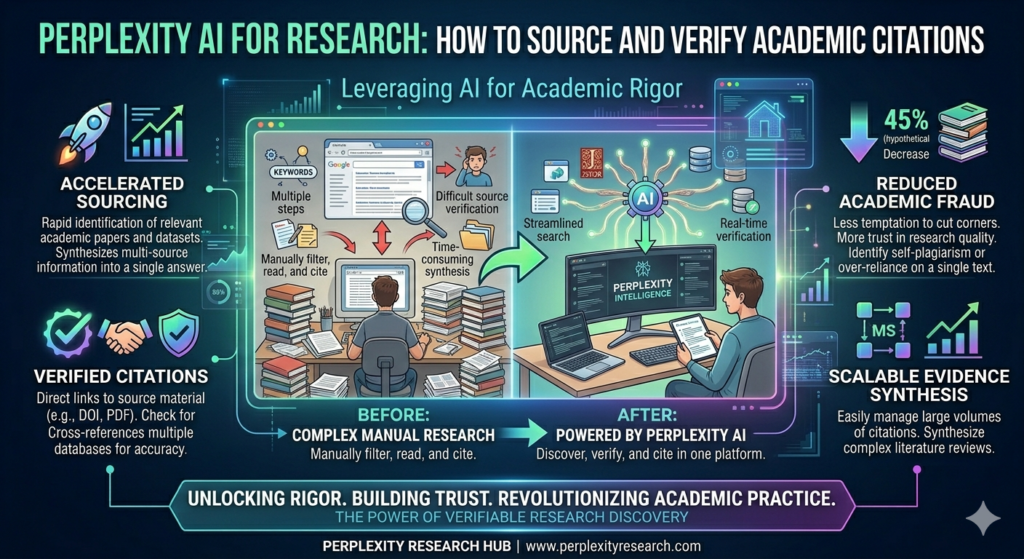
Perplexity AI for Research: How to Source and Verify Academic Citations, The academic research landscape has changed dramatically. Gone are the days when students and scholars had to rely solely on library databases, bouncing between Google Scholar, JSTOR, and scattered PDFs. Perplexity AI has emerged as a powerful research companion—but like any tool, its effectiveness depends entirely on how you use it.
This guide provides a comprehensive framework for using Perplexity AI in academic research, with a specific focus on its citation capabilities, limitations, and best practices for verification. Whether you’re an undergraduate writing your first term paper or a doctoral candidate conducting a literature review, understanding how to properly source and verify Perplexity-generated citations is essential to maintaining academic integrity.
What Makes Perplexity Different for Research?
Unlike traditional AI chatbots that generate responses solely from training data, Perplexity actively searches the web in real-time and builds answers from the sources it finds. Every response includes numbered inline citations that link directly to original sources, making it fundamentally different from tools like ChatGPT or Claude for research purposes.
Key Differentiators:
| Feature | Perplexity AI | ChatGPT/Claude |
|---|---|---|
| Source of information | Real-time web search + training data | Training data only (with optional search for paid tiers) |
| Citations | Inline numbered citations with source links | No automatic citations; may generate plausible but fake sources |
| Academic focus mode | Dedicated mode limiting search to peer-reviewed journals | Not available |
| Transparency | Shows sources in side panel with full metadata | Limited source visibility |
This citation-first approach is what makes Perplexity AI for research particularly interesting for academic work. It does not eliminate the need to teach information literacy, but it gives researchers a starting point where every claim comes with a traceable source.
The Academic Focus Mode: Your Gateway to Scholarly Sources
The feature that matters most for academic research is the Academic focus mode. When activated, Perplexity restricts its search to peer-reviewed journals, academic databases, and scholarly publications rather than pulling from the general web.
What Academic Mode Provides:
- Responses grounded in published research rather than blog posts or news articles
- Numbered citations linking to original papers
- Metadata including author names, publication titles, journal names, and publication dates
- Direct links to click through and read full sources
This is a significant distinction. Instead of getting a mix of Reddit threads and opinion pieces, students receive responses that can genuinely support academic work.
How to Enable Academic Mode
- Open Perplexity AI in your browser or app
- Locate the focus mode selector (usually near the search input)
- Select “Academic” from the dropdown menu
- Enter your research query
For best results, combine Academic mode with specific instructions like “peer-reviewed sources only” or “journals published after 2020.”

Deep Research: Going Beyond Surface-Level Answers
For longer research assignments, Perplexity’s Deep Research feature takes a fundamentally different approach. Instead of returning a single response, Deep Research conducts multiple rounds of searching, reading, and synthesizing.
The Deep Research Process:
- Generates a research plan based on your query
- Executes dozens of searches across academic repositories
- Reads through the results and identifies gaps
- Compiles a comprehensive report with full citations throughout
Think of it as the difference between asking a question and getting a quick answer versus asking a question and getting a research brief. For a graduate student working on a literature review or a teacher preparing a unit on a complex topic, Deep Research can surface connections across sources that would take hours to find manually.
Deep Research is available to Pro subscribers, with Advanced Deep Research processing hundreds of sources per query.
Spaces: Organizing Your Research Projects
One of Perplexity’s most practical features for academic work is Spaces. A Space is a persistent research environment where you can upload files, set custom AI instructions, and keep all your related searches organized in one place.
How Spaces Support Research:
| Feature | Academic Application |
|---|---|
| File uploads | Add assignment rubrics, preliminary sources, or PDFs of key papers |
| Custom instructions | Set “focus on peer-reviewed sources published after 2020” once; applies to all searches in the Space |
| Persistent context | AI remembers previous conversations; new queries build on prior research |
| Sharing | Teachers can create course Spaces with curated starting points |
For a research paper, you could create a Space, upload your assignment rubric, set instructions to prioritize recent peer-reviewed sources, and conduct all your research within that environment. The AI maintains context across sessions, so each new query builds on what came before.
The Citation Accuracy Challenge: What the Research Reveals
Here is where every researcher needs to pay close attention. While Perplexity leads its competitors in citation reliability, the numbers still demand caution.
The Tow Center Study (March 2025)
A study by the Tow Center for Digital Journalism at Columbia University tested eight AI search engines on their ability to accurately cite news sources. Perplexity performed best among all platforms tested, but its error rate was still 37%—meaning more than one in three cited claims contained inaccuracies.
The errors ranged from linking to sources that did not support the stated claim to citing articles that made different arguments than what the AI attributed to them. Being the best performer is not the same as being reliable enough to use without verification.
The KInIT Study on Source Credibility (2026)
A more recent study from the Kempelen Institute of Intelligent Technologies (KInIT), presented at the 2026 European Chapter of the ACL conference, evaluated chat assistants’ web search behavior with a focus on source credibility.
Using 100 claims across five misinformation-prone topics, researchers assessed GPT-4o, GPT-5, Perplexity, and Qwen Chat. Their findings revealed that Perplexity achieved the highest source credibility among all assistants tested.
The study also highlighted that GPT-4o exhibited “elevated citation of non-credible sources on sensitive topics”. This provides systematic evidence that Perplexity’s architecture is better designed for academic research than alternatives.
The Hearing Loss Study (2025)
A peer-reviewed study published in the International Journal of Audiology evaluated AI chatbots for hearing-health information. Researchers created 100 questions across five categories and scored answers for factual accuracy and completeness.
Key Findings:
- Under low accuracy threshold, Perplexity showed 79% validity (vs. 84% for ChatGPT-3.5)
- Under high accuracy threshold, validity dropped to 34% for Perplexity
- Perplexity had the highest overall reliability (Cronbach’s α = 0.83)
- 84% of outputs were rated “Difficult” or “Very Difficult” to read
- 68% read at college level
The study concluded: “AI chatbots deliver generally accurate hearing-health content, but high-threshold accuracy, domain-specific reliability and readability remain suboptimal. They should supplement, not replace professional counselling”.
The Narcolepsy Study (2025)
Presented at the European Respiratory Society Congress 2025, this study evaluated ChatGPT, Gemini, and Perplexity on 28 narcolepsy-related questions. Three physicians rated answers for accuracy and completeness.
Results:
- Accuracy: Perplexity median 4.83/5, ChatGPT 4.67/5, Gemini 4.33/5 (differences not statistically significant)
- Completeness: Perplexity ranked highest (2.67/3), significantly outperforming Gemini (p < 0.001)
- Only 2 Perplexity answers scored below accuracy threshold vs. 11 for ChatGPT and Gemini
The authors concluded: “Perplexity performed slightly better while Gemini was worst, with significant differences in completeness”.
Academic User Study (2026)
A February 2026 study published in SAGA: Journal of English Language Teaching and Applied Linguistics examined students’ voices on utilizing Perplexity AI in academic writing classes. The research highlighted both benefits and challenges of integrating Perplexity into academic workflows, reinforcing that while students find the tool valuable for sourcing, proper training in citation verification remains essential.
Step-by-Step Guide: Generating and Verifying Citations
Based on the research findings and best practices from academic users, here is a systematic approach to using Perplexity for academic citations.
Step 1: Set Up Your Research Environment
Create a Space for your specific research project:
- Navigate to Spaces in Perplexity
- Create a new Space with your project name
- Upload relevant files (assignment instructions, preliminary sources)
- Set custom instructions: “Focus on peer-reviewed sources from the past 5 years. Format citations in APA 7th edition.”
Step 2: Enable Academic Mode and Use Deep Research
For comprehensive research:
- Select Academic focus mode
- For complex topics, activate Deep Research
- Enter your query with specific parameters
- Review the generated research summary and citations
Pro Tip: For niche academic sources, Perplexity typically returns first-source results in about 4.2 seconds—significantly faster than Gemini’s 11.8 seconds. This speed advantage is crucial when iterating through conceptual variations.
Step 3: Extract Citation Metadata
Perplexity displays citations at the bottom of each response. To extract properly formatted citations:
- Click on any citation source in the response
- Select “View citation details”
- Verify the complete metadata: author names, publication year, article title, journal name (italicized), volume, issue, page numbers, DOI
- If any field is missing, manually supplement or use a different source
Step 4: Generate References in Your Required Format
To generate proper reference entries:
Prompt Example:
“Please provide the APA 7th edition reference entry for this source: [DOI or URL]”
For multiple sources:
“List the following three sources in APA 7th edition format. Each entry should be on a separate line with no numbering. [Source 1 DOI] [Source 2 URL] [Source 3 DOI]”
Step 5: Verify Every Citation Through Cross-Reference
This is the most critical step. Based on the 37% error rate found in the Tow Center study, never trust AI-generated citations without verification.
Verification Protocol:
| Step | Action | Tool |
|---|---|---|
| 1 | Search for the author + year + key title words | Google Scholar |
| 2 | Locate the original paper in results | Google Scholar / PubMed / Scopus |
| 3 | Click the “Cite” button and select your format | Google Scholar |
| 4 | Compare Perplexity’s citation with Google Scholar’s version | Manual comparison |
| 5 | Correct any errors in author order, title capitalization, italicization, or DOI format | Manual correction |
Common errors to check:
- Author names reversed or misspelled
- Publication year incorrect
- Title capitalization inconsistent with your style guide
- Journal name missing italics
- DOI missing or incomplete (should be
https://doi.org/xxxx) - Volume/issue/page numbers transposed
Step 6: Read the Original Source
This cannot be emphasized enough. The KInIT study emphasized evaluating “groundedness”—whether responses actually align with cited sources. Even when a citation links to the correct paper, Perplexity’s summary may oversimplify or distort the findings.
Download and read the full text of each source you intend to cite. Academic integrity requires engaging with original research, not relying on AI-generated summaries.
Step 7: Maintain a Verified Reference List
As you verify each source, add it to a running reference list in your citation manager (Zotero, Mendeley, EndNote). This creates a verified corpus of sources that you can trust for your final paper.
Perplexity vs. Gemini for Academic Research
Recent testing has revealed distinct strengths for each platform.
| Metric | Perplexity AI (Pro) | Google Gemini (v2.5) |
|---|---|---|
| First-source latency | 4.2 sec median | 11.8 sec median |
| Citation hallucination rate | 6.3% | 2.1% |
| Non-English source recall | Strong for Japanese/Korean STEM | Better for Spanish/Portuguese |
| Grey literature discovery | Excellent (NIH reports, NSF abstracts) | Fair |
| Library link resolver support | Limited | Robust |
| Contextual synthesis | Good | Superior |
The Verdict: Perplexity wins on speed and breadth—it’s better for initial scoping, discovering preprints, finding grey literature, and surface-level retrieval. Gemini excels at depth and context—it’s stronger for tracing citation lineages, synthesizing across multiple papers, and handling complex Boolean queries.
Practical Recommendation: Use Perplexity for initial source discovery, then feed the top sources into Gemini for synthesis and contextual analysis.
Practical Tips for Academic Researchers
For Undergraduate Students
- Use Academic mode as default for all course-related research
- Create a Space for each paper to keep sources organized
- Verify citations using Google Scholar before adding to your reference list
- Never copy-paste AI-generated text without reading the original source
For Graduate Students and Researchers
- Combine Perplexity with institutional database access. Perplexity can cite paywalled papers, but you need library access to read them.
- Use Deep Research for literature reviews. The multi-round search can surface connections across dozens of papers.
- Cross-verify with specialized databases. For medical research, check PubMed; for engineering, check IEEE Xplore.
- For obscure sources, Perplexity’s aggressive repository crawling is invaluable. It found a 1989 monograph with no ISBN by crawling a national library’s digital archive.
For Educators
- Assign source verification as part of the grade. Require students to click through 3-5 Perplexity citations, read originals, and note which were accurate.
- Create course Spaces with curated starting points and instructions.
- Model limitations live. Run a demonstration showing a Perplexity response, then check citations together. When students see errors in real time, they internalize verification habits.
- Discuss the 37% error rate explicitly. Information literacy education must include AI literacy.
For Researchers Working with Non-English or Niche Sources
Perplexity performs well for Japanese and Korean STEM sources but less effectively for Slavic languages. For non-English research:
- Add language-specific terms to queries
- Use library databases for comprehensive coverage
- Consider hybrid approaches: Perplexity for discovery, specialized databases for verification
Understanding Perplexity’s Citation Mechanism
To be cited by Perplexity (if you’re publishing research you want the tool to find), understand its selection criteria:
Perplexity’s Source Selection Process:
- Query → Retrieval: Identifies relevant documents based on intent matching, semantic distance, entity recognition, and topic authority
- Filtering → Reliability Check: Prefers factual accuracy, timeliness, clarity, stable entities, credible authorship, verifiable claims
- Ranking → Evidence Score: Evaluates structure clarity, content extractability, clearly defined terms, topic specificity, authority signals
- Composition → Source Selection: Highest-ranking pages are cited, paraphrased, or referenced
For your research, this means:
- Perplexity prefers sources with clear structure (lists, definitions, step-by-step guides)
- It values authoritativeness—publications from established journals rank higher
- It prioritizes verifiable claims supported by evidence
Understanding these mechanics helps you evaluate why certain sources appear in your results and whether they merit inclusion in your research.
Limitations Every Researcher Should Know
1. Citation Accuracy Is Not Guaranteed
The Tow Center’s 37% error rate for news citations is a sobering reminder. While academic mode may perform differently, no large-scale study of academic citation accuracy has been published. Treat every citation as needing verification.
2. Paywalled Sources Create Access Barriers
Perplexity can cite paywalled academic papers, but students may not be able to access the full text without institutional database access. The citation looks complete, but the source cannot be verified without the actual paper.
3. AI Summaries Can Misrepresent Sources
Even when a citation links to the correct paper, Perplexity’s summary may oversimplify or distort the findings. This is the subtlest and most dangerous limitation—the citation looks right even when the interpretation is wrong.
4. Free Tier Limitations
The free tier caps academic-mode queries and may omit deep repository crawling (e.g., HathiTrust or BASE integration). For serious academic work, the Pro tier delivers measurable ROI in time saved.
5. Domain-Specific Reliability Varies
The hearing loss study found that Perplexity’s reliability dropped below 0.70 for cochlear implant, tinnitus, and hearing aid questions. For specialized topics, domain-specific databases remain essential.
The Future of AI-Assisted Academic Research
As of April 2026, AI research tools are evolving rapidly. University partnerships are expanding—American University’s Kogod School of Business, Texas A&M, and Texas State University have integrated Perplexity across curricula. Publisher integrations with Wiley and other academic publishers are bringing peer-reviewed content directly into search results.
The trajectory is clear: AI research assistants will become standard academic infrastructure. But the core principle remains unchanged: these tools supplement, not replace, scholarly rigor.
Conclusion: A Framework for Responsible AI-Assisted Research
Perplexity AI is a powerful research tool—perhaps the best available for citation-first academic discovery. But its power demands responsibility.
The Responsible Research Framework:
- Start with Academic mode and Deep Research for comprehensive source discovery
- Extract citations with clear formatting prompts to ensure consistent metadata
- Verify every source through Google Scholar, PubMed, or your institution’s databases
- Read the original full text before citing—never rely solely on AI summaries
- Maintain verified reference lists in citation management software
- Use complementary tools strategically: Perplexity for discovery, Gemini for synthesis, library databases for comprehensive coverage
Remember the study’s conclusion: AI chatbots “should supplement, not replace” traditional research methods. Perplexity can find you a 1989 monograph with no ISBN in five seconds, but you must read it. It can generate APA citations instantly, but you must verify them. It can summarize research, but you must engage with the original arguments.
Used correctly, Perplexity AI doesn’t replace the scholar—it amplifies the scholar’s ability to discover, verify, and synthesize knowledge. The future of academic research is not AI alone. It is human intelligence, augmented by AI, guided by scholarly rigor, and grounded in verified sources.