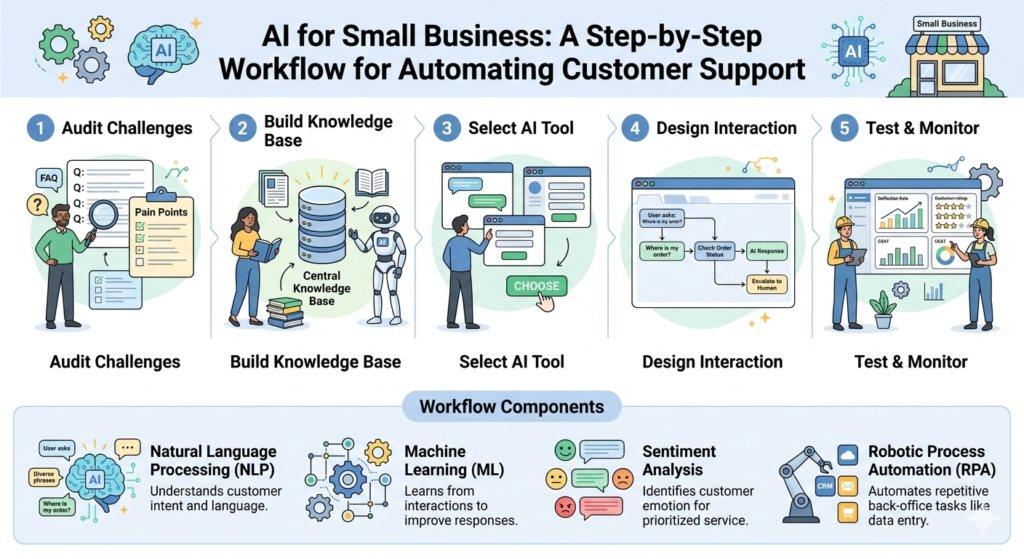
AI for Small Business: A Step-by-Step Workflow for Automating Customer Support
AI for Small Business: A Step-by-Step Workflow for Automating Customer Support, Running a small business is no small feat. Between managing operations, marketing, product development, and finances, customer support often becomes the bottleneck that eats up hours of your day. The expectation is constant: customers want instant responses, 24/7 availability, and personalized service. For a lean team, meeting these demands without burning out feels impossible.
Enter AI-powered customer support automation.
Artificial intelligence is no longer a luxury reserved for enterprise corporations with massive budgets. Today, affordable, user-friendly AI tools allow small businesses to automate up to 80% of routine customer inquiries, freeing you to focus on high-value work and strategic growth.
This guide provides a step-by-step workflow to implement AI customer support automation in your small business—from selecting the right tools to training your AI, integrating with existing systems, and maintaining quality control.
Why Small Businesses Need AI Customer Support
Before diving into the workflow, let’s understand why automation is essential for small businesses in 2026.
The Challenges of Manual Customer Support
| Challenge | Impact |
|---|---|
| Limited Staff | One or two team members handle all inquiries, leading to burnout and inconsistent response times |
| High Volume of Repetitive Questions | 60–80% of support inquiries are repetitive (order status, shipping policies, password resets, pricing questions) |
| 24/7 Expectations | Customers expect instant responses regardless of time zone or business hours |
| Slow Response Times | Delayed replies result in lost sales, negative reviews, and churn |
| Scaling Difficulties | As your business grows, support volume outpaces your ability to hire and train staff |
The Benefits of AI Automation
| Benefit | Real-World Impact |
|---|---|
| Instant Responses | AI chatbots answer customer questions in seconds, not hours |
| 24/7 Availability | Support operates continuously, capturing leads and resolving issues outside business hours |
| Cost Efficiency | Reduce support costs by 30–50% by automating routine inquiries |
| Consistency | AI delivers consistent answers based on your knowledge base, eliminating human error |
| Scalability | AI handles 10 or 10,000 conversations simultaneously with no additional staffing |
| Data Insights | AI analytics reveal common customer questions, pain points, and areas for improvement |
The Bottom Line: AI customer support allows small businesses to deliver enterprise-level service without enterprise-level headcount.
Step 1: Audit Your Current Support Operations
Before implementing any new system, you need to understand exactly what you are dealing with. A thorough audit reveals where automation will have the biggest impact.
1.1 Analyze Your Support Volume
Start by gathering data from your existing support channels (email, social media DMs, contact forms, phone logs).
| Question to Answer | How to Find It |
|---|---|
| How many support inquiries do you receive daily/weekly? | Count emails, messages, and calls over a 30-day period |
| What are the peak times? | Identify hours/days with highest volume |
| What are the most common questions? | Categorize inquiries by topic |
| What percentage of questions are repetitive? | Look for patterns (e.g., “Where is my order?” appears 30+ times) |
| What is your current average response time? | Measure from inquiry receipt to first response |
| What is your current resolution time? | Measure from inquiry to resolution |
1.2 Categorize Inquiry Types
Create a simple categorization system to understand what you are dealing with:
| Category | Examples | Automation Potential |
|---|---|---|
| Order Status | “Where is my package?” “Has my order shipped?” | High – Fully automatable |
| Shipping & Returns | “What is your return policy?” “How do I return an item?” | High – Fully automatable |
| Product Questions | “Does this come in size M?” “What are the dimensions?” | Medium – Automate with knowledge base |
| Account Issues | “I forgot my password” “How do I update my address?” | High – Automate with self-service links |
| Technical Support | “The app is crashing” “I can’t log in” | Low – Requires human intervention |
| Billing Questions | “When will I be charged?” “How do I cancel?” | Medium – Automate with clear policy answers |
| Complex Complaints | “My order arrived damaged and I need a replacement” | Low – Requires human judgment |
1.3 Document Your Most Common Questions
Create a list of your top 20–30 most frequent customer questions. For each, document:
- The exact question (as customers typically phrase it)
- Your current answer
- The time it takes to respond
- Any resources needed to answer (order lookup, policy document, etc.)
This list will become the foundation of your AI knowledge base.
Step 2: Choose the Right AI Tools for Your Business
The AI customer support landscape has exploded with options tailored specifically for small businesses. The key is selecting tools that match your needs, budget, and technical comfort level.
2.1 Core AI Support Tools
| Tool | Best For | Starting Price | Key Features |
|---|---|---|---|
| Intercom | E-commerce, SaaS businesses | $39/month | AI chatbot, live chat, email automation, knowledge base |
| Zendesk AI | Multi-channel support | $55/month | Ticket routing, AI replies, analytics |
| Freshdesk | Growing small businesses | Free plan available | AI-powered ticketing, chat, knowledge base |
| Gorgias | E-commerce (Shopify, BigCommerce) | $60/month | Integrated with store data, order lookups, refund automation |
| ChatGPT (Custom GPTs) | Simple FAQ automation | $20/month | Customizable AI assistant, integrates via API |
| ManyChat | Social media (Instagram, Facebook) | Free plan available | AI chatbots for Instagram DMs, Facebook Messenger |
| Help Scout | Email-focused support | $20/month | AI assist for drafting replies, knowledge base |
2.2 Build Your Tech Stack
Most small businesses do not need a complex enterprise system. A simple stack often includes:
- AI Chatbot – Handles first-tier inquiries, captures leads, deflects common questions
- Knowledge Base – Self-service FAQ section on your website
- Help Desk / Ticketing – Manages conversations that escalate beyond AI capabilities
Example Stack for an E-commerce Business:
- Gorgias – Integrated with Shopify, handles order lookups, returns, and shipping questions
- Knowledge Base – Hosted on Gorgias or Help Scout, containing detailed policies and guides
- Human Backup – One support agent handles complex issues that AI cannot resolve
Example Stack for a Service-Based Business:
- Intercom – AI chatbot on website, captures leads, answers pricing questions
- Email Automation – Auto-replies for common inquiries
- Human Backup – Owner or team member handles booking and custom inquiries
2.3 Integration Requirements
Ensure your chosen tools integrate with your existing systems:
| Integration | Why It Matters |
|---|---|
| E-commerce Platform (Shopify, WooCommerce) | AI can access order status, shipping info, and customer history |
| CRM (HubSpot, Salesforce) | AI can pull customer information and update records |
| Email Platform (Gmail, Outlook) | AI can draft and send responses from your existing email |
| Social Media (Instagram, Facebook) | AI can respond to DMs and comments |
| SMS | AI can send order updates and appointment reminders |
Step 3: Build Your AI Knowledge Base
Your AI is only as good as the information you feed it. A well-structured knowledge base ensures your AI provides accurate, helpful responses.
3.1 What to Include in Your Knowledge Base
Create clear, detailed articles for each of your top customer questions:
| Article Type | Content |
|---|---|
| Shipping & Delivery | Shipping costs, delivery times, tracking information, international shipping policies |
| Returns & Refunds | Return policy, how to initiate a return, refund processing time, exchange process |
| Order Management | How to check order status, modify an order, cancel an order |
| Account Management | Password reset, account deletion, updating profile information |
| Payment & Billing | Accepted payment methods, subscription billing, invoice requests |
| Product Information | Sizing guides, material details, care instructions, compatibility |
| Technical Support | Troubleshooting guides, app setup instructions, common error fixes |
| Policies | Privacy policy, terms of service, warranty information |
3.2 Best Practices for Knowledge Base Content
| Practice | Why It Matters |
|---|---|
| Write in simple language | Customers have varying reading levels; avoid jargon and complex terminology |
| Use short paragraphs and bullet points | Improves scannability and comprehension |
| Include visuals | Screenshots, diagrams, and videos reduce confusion |
| Add FAQs at the end | Capture common follow-up questions |
| Keep it updated | Outdated information destroys trust and increases support volume |
| Make it searchable | Ensure customers can easily find articles via search bar |
3.3 Train Your AI
Modern AI tools use your knowledge base, product catalog, and historical conversations to generate responses. Here is how to train them:
- Import existing content – Upload your FAQ documents, policy pages, and past support conversations
- Define response tone – Choose a consistent voice (professional, friendly, casual) that matches your brand
- Set boundaries – Define what the AI should not answer (e.g., sensitive account details, refund approvals)
- Test with real scenarios – Simulate common customer conversations to validate accuracy
- Iterate – Continuously refine based on performance
Step 4: Design Your Automation Workflow
Now it is time to map out exactly how customer conversations flow through your automated system.
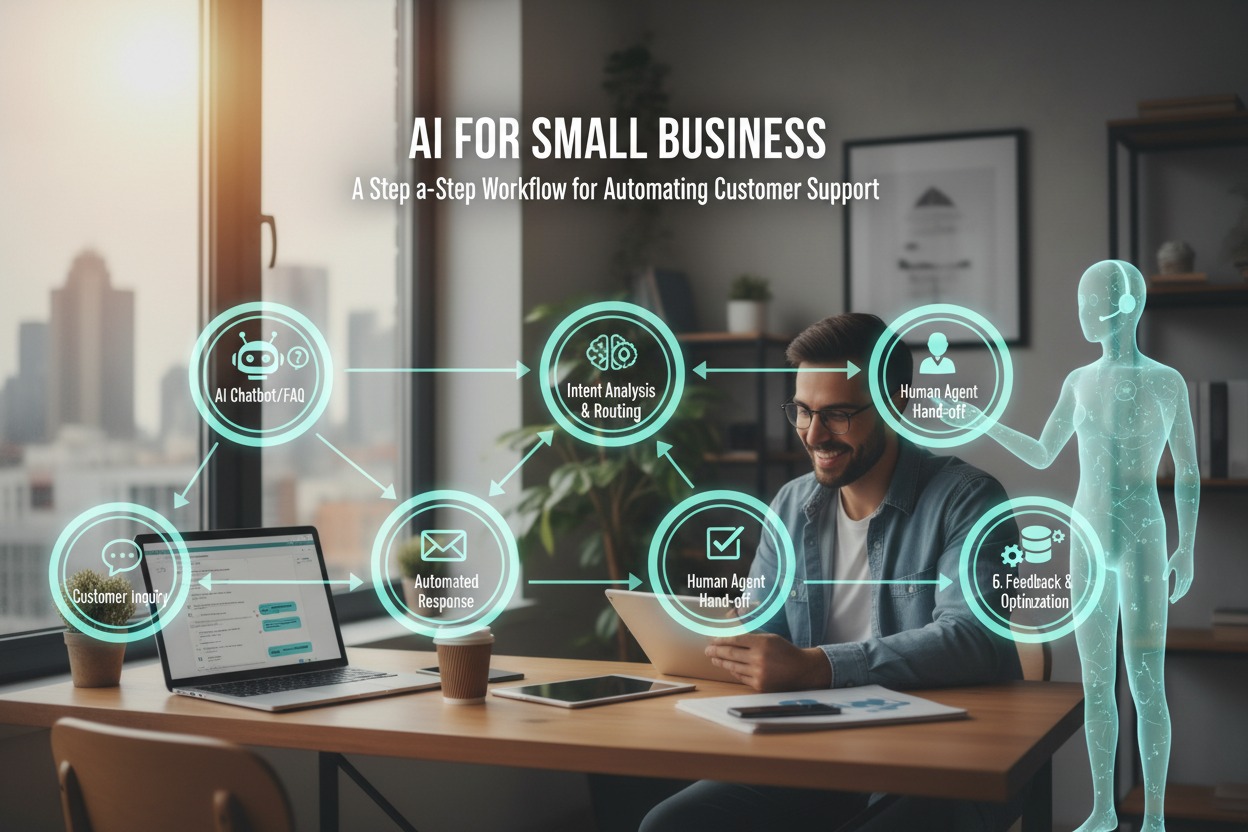
4.1 The Ideal Customer Support Workflow
Customer Inquiry
       ↓
┌──────────────────────────────────────┐
│         AI Chatbot (First Tier)       │
│  • Answers common questions           │
│  • Provides self-service links        │
│  • Captures lead information          │
└──────────────────────────────────────┘
       ↓
    Resolved? ────YES────→ Ticket Closed
       ↓
         NO
       ↓
┌──────────────────────────────────────┐
│         Intelligent Routing           │
│  • Identify category/urgency          │
│  • Route to appropriate human         │
└──────────────────────────────────────┘
       ↓
┌──────────────────────────────────────┐
│      Human Support Agent              │
│  • AI-assisted drafting               │
│  • Complex issue resolution           │
│  • Personalized follow-up             │
└──────────────────────────────────────┘
       ↓
    Resolved? ────YES────→ Ticket Closed
       ↓
         NO
       ↓
┌──────────────────────────────────────┐
│      Escalation (Manager/Specialist)  │
└──────────────────────────────────────┘
4.2 Build Automated Responses for Common Scenarios
Create automated workflows (often called “triggers” or “automations”) for your most frequent scenarios.
Scenario 1: Order Status Inquiry
| Step | Action |
|---|---|
| 1 | Customer asks “Where is my order?” |
| 2 | AI identifies intent (order status) |
| 3 | AI retrieves order details via integration (Shopify/API) |
| 4 | AI responds with tracking link and estimated delivery date |
| 5 | Ticket marked resolved (no human touch required) |
Scenario 2: Return Request
| Step | Action |
|---|---|
| 1 | Customer says “I want to return this item” |
| 2 | AI provides return policy and steps |
| 3 | AI asks for order number to verify eligibility |
| 4 | If eligible, AI generates return label (via integration) |
| 5 | Ticket marked resolved or escalated for review |
Scenario 3: Complex Issue (Escalation)
| Step | Action |
|---|---|
| 1 | Customer describes issue (e.g., damaged item) |
| 2 | AI recognizes complexity based on keywords |
| 3 | AI collects initial details (order number, photos) |
| 4 | AI routes ticket to human agent with context summary |
| 5 | Human agent resolves with AI-assisted drafting |
4.3 Set Up Escalation Rules
Define when AI should hand off to a human:
| Rule | Action |
|---|---|
| Sentiment analysis detects frustration/anger | Escalate immediately to most senior agent |
| Customer asks to speak to a human | Escalate immediately (do not force AI) |
| Question requires account-specific action (refund, cancellation) | Escalate with context |
| AI confidence score below threshold (e.g., <80%) | Escalate for human review |
| Three failed attempts to resolve | Escalate to prevent frustration |
Step 5: Integrate with Your Existing Systems
Seamless integration ensures your AI has the data it needs to provide accurate, personalized responses.
5.1 Essential Integrations
| Integration | What It Enables |
|---|---|
| E-commerce Platform | AI can look up orders, process returns, check inventory |
| Shipping Carriers | AI can provide real-time tracking updates |
| Payment Processor | AI can answer billing questions, confirm payments |
| CRM | AI can pull customer history, update contact records |
| Calendar / Booking | AI can check availability, schedule appointments |
5.2 Single Sign-On (SSO) for Staff
Ensure your team can access all support tools with one login. Most modern help desks offer SSO with Google Workspace or Microsoft 365, reducing friction and improving security.
5.3 Data Privacy Considerations
When integrating AI with customer data, keep these best practices in mind:
- Limit data access – AI should only access information necessary to answer the question
- Anonymize training data – Remove personally identifiable information from training datasets
- Comply with regulations – Ensure your AI implementation meets GDPR, CCPA, and industry-specific requirements
- Transparency – Inform customers they are interacting with AI and offer human alternative
Step 6: Test, Launch, and Monitor
Before going live, test your system thoroughly. After launch, monitor performance and continuously optimize.
6.1 Pre-Launch Testing Checklist
| Test | What to Verify |
|---|---|
| Knowledge Base Accuracy | All articles are up-to-date and cover top questions |
| AI Response Quality | Responses are accurate, on-brand, and helpful |
| Escalation Flow | Complex issues route to correct human agents |
| Integration Functionality | Order lookups, tracking, returns work correctly |
| Mobile Experience | Chatbot functions properly on mobile devices |
| Multi-Language Support | If applicable, translations are accurate |
6.2 Phased Rollout Approach
Instead of turning on AI for all channels at once, consider a phased approach:
| Phase | Action |
|---|---|
| Phase 1 (Week 1) | Launch AI chatbot on website only, with human backup available |
| Phase 2 (Week 2) | Enable AI for email auto-responses (simple inquiries) |
| Phase 3 (Week 3) | Expand to social media DMs |
| Phase 4 (Week 4) | Full automation with intelligent routing |
6.3 Key Metrics to Track
Monitor these metrics to measure success and identify areas for improvement:
| Metric | What It Measures | Target |
|---|---|---|
| Deflection Rate | Percentage of inquiries resolved without human intervention | 60–80% |
| Average Response Time | Time from inquiry to first response | < 1 minute for AI; < 1 hour for humans |
| Customer Satisfaction (CSAT) | Customer rating of support experience | > 90% |
| Resolution Time | Total time from inquiry to resolution | 50% reduction from baseline |
| Human Agent Time Saved | Hours saved by automation | Calculate ROI |
| Escalation Rate | Percentage of inquiries requiring human | 20–40% |
6.4 Continuous Improvement
- Weekly: Review AI conversation logs; correct incorrect responses
- Monthly: Analyze deflection rate; identify new common questions for knowledge base
- Quarterly: Update knowledge base with product/policy changes
- Annually: Evaluate tools; upgrade based on business needs
Step 7: Maintain Human Oversight and Quality Control
AI is a powerful tool, but it is not a replacement for human empathy, judgment, and relationship-building. The goal is augmentation, not replacement.
7.1 When Humans Should Always Be Involved
| Situation | Why Human Intervention Matters |
|---|---|
| High-Value Customers | VIP customers expect personalized attention |
| Complex Complaints | Damaged orders, billing errors, account security issues require judgment |
| Emotional Situations | Frustrated, angry, or upset customers need empathy AI cannot replicate |
| New Product Launches | Unexpected questions may not be in knowledge base yet |
| Policy Exceptions | Deciding when to make exceptions requires human discretion |
7.2 AI-Assisted Human Support
Equip your human agents with AI tools to work more efficiently:
- AI-generated draft replies – Agents review and edit rather than starting from scratch
- Conversation summaries – AI summarizes long threads so agents can quickly catch up
- Knowledge base suggestions – AI recommends relevant articles for agents to share
- Sentiment analysis – AI flags conversations requiring urgent or empathetic response
7.3 Regular Review Cadence
| Frequency | Review Activity |
|---|---|
| Daily | Check escalated conversations; ensure no urgent issues unresolved |
| Weekly | Review AI conversation samples; update knowledge base gaps |
| Monthly | Analyze metrics; identify trends; adjust workflows |
| Quarterly | Customer feedback review; tool performance assessment |
Common Pitfalls and How to Avoid Them
| Pitfall | Why It Happens | Solution |
|---|---|---|
| AI Giving Wrong Answers | Knowledge base outdated or incomplete | Regularly audit and update knowledge base |
| Customer Frustration with AI | AI cannot resolve issue but blocks human access | Always offer clear “Talk to Human” option |
| Impersonal Experience | AI responses are robotic or generic | Customize AI tone; use customer name; add personality |
| Over-Automation | Automating issues that require human judgment | Define clear escalation rules; keep humans for complex issues |
| Integration Failures | AI cannot access order data or customer history | Test integrations thoroughly; maintain API connections |
| Ignoring AI Analytics | Not using data to improve | Review metrics weekly; act on insights |
Cost Analysis: ROI of AI Customer Support
Sample Cost Breakdown (Small E-commerce Business)
| Expense | Before AI | After AI |
|---|---|---|
| Support Staff (Part-time) | $2,500/month (25 hours/week) | $1,000/month (10 hours/week) |
| AI Tools (Gorgias, etc.) | $0 | $150/month |
| Total Monthly Cost | $2,500 | $1,150 |
| Monthly Savings | – | $1,350 |
| Annual Savings | – | $16,200 |
Non-Financial Benefits
- Faster response times lead to higher customer satisfaction
- 24/7 availability captures after-hours sales
- Reduced burnout improves staff retention
- Scalability supports business growth without proportional hiring
Frequently Asked Questions (FAQ)
Q: Is AI customer support expensive for a small business?
A: No. Many AI tools offer free plans or start at $20–$50 per month. For most small businesses, the cost is significantly less than hiring additional staff .
Q: Will customers be frustrated talking to a bot?
A: Only if the bot is poorly implemented. When done correctly, customers appreciate instant answers. Always provide a clear path to speak with a human for complex issues .
Q: Can AI handle returns and refunds?
A: Yes, when integrated with your e-commerce platform. AI can verify eligibility, generate return labels, and even initiate refunds based on your rules .
Q: How long does it take to set up?
A: A basic setup (chatbot + knowledge base) can be implemented in 1–2 weeks. Full integration and workflow optimization typically takes 3–4 weeks .
Q: Do I need technical skills to set this up?
A: Most modern tools are designed for non-technical users. If you can set up a website or email account, you can configure most AI support tools .
Q: What if my business has unique or complex products?
A: AI works best with clear, documented information. Invest time in building a comprehensive knowledge base. For highly technical products, consider hybrid approach: AI handles basic inquiries; specialists handle technical support .
Conclusion: Start Small, Scale Smart
Implementing AI customer support does not require a massive upfront investment or complete overhaul of your operations. The most successful small businesses start with one channel (e.g., website chatbot), one type of inquiry (e.g., order status), and expand from there.
Your 30-Day Action Plan:
| Week | Action |
|---|---|
| Week 1 | Audit current support; document top 20 questions |
| Week 2 | Choose AI tools; build knowledge base |
| Week 3 | Configure workflows; test with internal team |
| Week 4 | Launch with one channel; monitor metrics; iterate |
By following this step-by-step workflow, you can transform customer support from a time-consuming burden into a seamless, scalable system that delights customers and frees you to focus on what matters most—growing your business.